gobjects.h
| Types | |
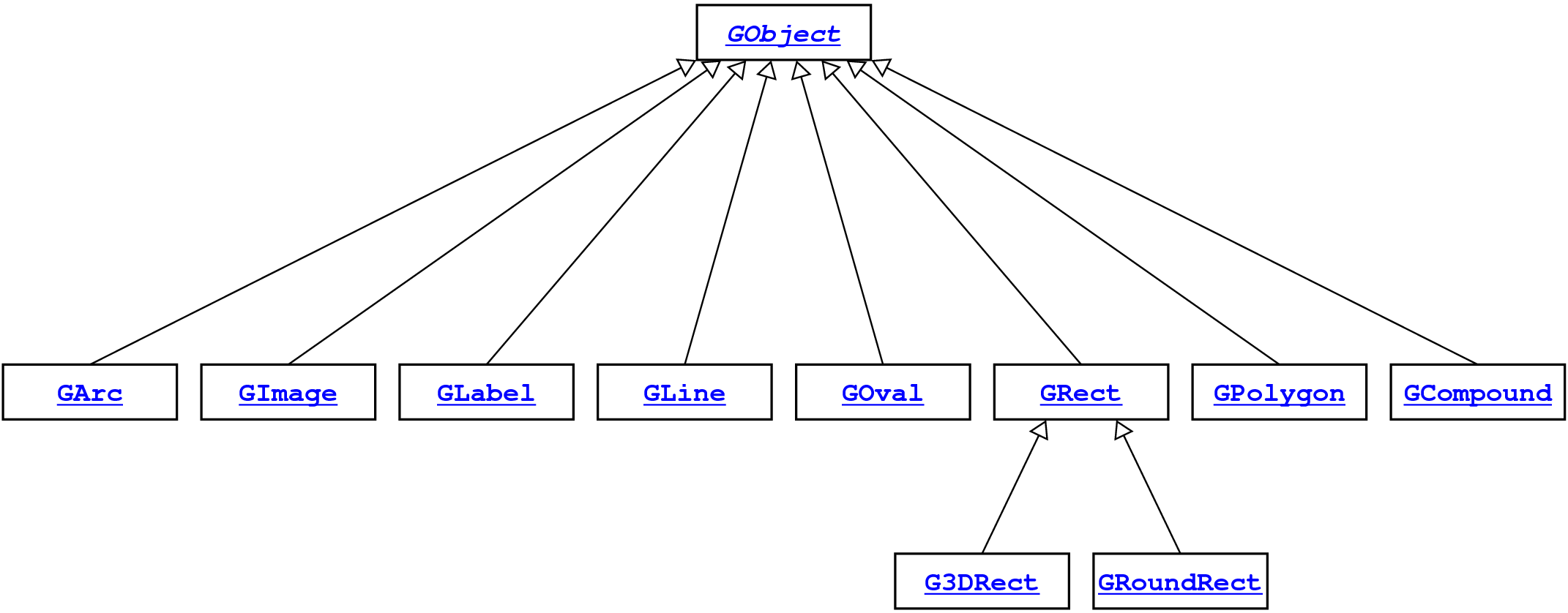
| This type represents an abstract type that unifies the set of all graphics objects. | |
| This type represents a graphical object whose appearance consists of a rectangular box. | |
| This type represents a rectangular box with rounded corners. | |
| This type represents a rectangular box that can appear raised or lowered. | |
| This type represents an oval inscribed in a rectangular box. | |
| This type represents a line segment. | |
| This type represents an elliptical arc. | |
| This subtype represents a text string. | |
| This subtype represents an image from a file. | |
| This subtype represents a polygon bounded by line segments. | |
| This subtype consists of a collection of other graphical objects. | |
| Functions | |
| Frees the memory associated with the object. | |
| Returns the x-coordinate of the object. | |
| Returns the y-coordinate of the object. | |
Returns the location of this object as a GPoint. | |
| Sets the location of this object to the specified coordinates. | |
Moves the object on the screen using the displacements dx and dy. | |
| Returns the width of this object, which is defined to be the width of the bounding box. | |
| Returns the height of this object, which is defined to be the height of the bounding box. | |
Returns the size of the object as a GDimension. | |
| Returns the bounding box of this object, which is defined to be the smallest rectangle that covers everything drawn by the figure. | |
| Sets the color used to display this object. | |
| Returns the color used to display this object. | |
| Sets whether this object is visible. | |
Returns true if this object is visible. | |
| Moves this object one step toward the front in the z dimension. | |
| Moves this object to the front of the display in the z dimension. | |
| Moves this object one step toward the back in the z dimension. | |
| Moves this object to the back of the display in the z dimension. | |
Returns true if the specified point is inside the object. | |
Returns the subtype of the object as a string, as in "GOval" or "GRect". | |
Returns a pointer to the GCompound that contains this object. | |
| Changes the size of this object to the specified width and height. | |
| Changes the bounds of this object to the specified values. | |
Sets the fill status for gobj, where false is outlined and true is filled. | |
Returns true if gobj is filled. | |
| Sets the color used to display the filled region of this rectangle. | |
Returns the color used to display the filled region of gobj. | |
Creates a new GRect with the specified bounds. | |
Creates a new GRoundRect with the specified dimensions. | |
Creates a new G3DRect with the specified dimensions. | |
| Indicates whether this object appears raised. | |
Returns true if this object appears raised. | |
Creates a new GOval with the specified bounds. | |
Creates a new graphical line connecting the points (x0, y0) and (x1, y1). | |
Sets the start point for the line to (x, y), leaving the end point unchanged. | |
Sets the end point for the line to (x, y), leaving the start point unchanged. | |
Returns the point at which a GLine or GArc starts. | |
Returns the point at which a GLine or GArc ends. | |
Creates a new GArc consisting of an elliptical arc. | |
Sets the starting angle for this GArc object. | |
Returns the starting angle for this GArc object. | |
Sets the sweep angle for this GArc object. | |
Returns the sweep angle for this GArc object. | |
| Changes the boundaries of the rectangle used to frame the arc. | |
| Returns the boundaries of the rectangle used to frame the arc. | |
Creates a GLabel object containing the specified string, positioned with an origin of (0, 0). | |
Changes the font used to display the GLabel as specified by the string font, which has the following format: family-style-sizewhere both style and size are optional. | |
Returns the current font for the GLabel. | |
Changes the string stored within the GLabel object, so that a new text string appears on the display. | |
| Returns the string displayed by this object. | |
| Returns the maximum distance strings in this font extend above the baseline. | |
| Returns the maximum distance strings in this font descend below the baseline. | |
Constructs a new image by loading the image from the specified file, which is either in the current directory or a subdirectory named images. | |
| Constructs a new empty polygon. | |
Adds a vertex at (x, y) relative to the polygon origin. | |
Adds an edge to the polygon whose components are given by the displacements dx and dy from the last vertex. | |
| Adds an edge to the polygon specified in polar coordinates. | |
| Returns a vector whose elements are pointers to the GPoint values that represent the vertices. | |
| Creates a new graphical compound with no internal components. | |
| Adds the object to the compound. | |
| Removes the object from the compound. | |
typedef struct GObjectCDT *GObject;
GObject directly.
Graphical objects are created instead by calling the constructor for
one of the concrete subclasses, as follows:
newGRect(x, y, width, height)
newG3DRect(x, y, width, height, raised)
newGRoundRect(x, y, width, height, corner)
newGOval(x, y, width, height)
newGLine(x0, y0, x1, y1)
newGArc(x, y, width, height, start, sweep)
newGImage(filename, x, y)
newGLabel(str, x, y)
newGPolygon
newCompound
Even though C has no object-oriented hierarchies, this interface
defines the types GArc, GCompound,
GImage, GLabel, GLine,
GOval, GPolygon, GRect,
GRoundRect, and G3DRect as synonyms
for GObject. Doing so helps to clarify what types
are expected by each function and simplifies the process of
converting code from languages that implement full hierarchies.
typedef GObject GRect;
   main() {
      GWindow gw = newGWindow(500, 300);
      printf("This program draws a red rectangle at (0, 0).\n")
      GRect rect = newGRect(0, 0, 200, 100);
      setFilled(rect, true);
      setColor(rect, "RED");
      add(gw, rect);
   }
Usage:
color = getFillColor(gobj);
typedef GRect GRoundRect;
Usage:
rect = newGRect(x, y, width, height);
typedef GRect G3DRect;
Usage:
GRoundRect rect = newGRoundRect(x, y, width, height, corner);
typedef GObject GOval;
   main() {
      GWindow gw = newGWindow(500, 300);
      printf("This program draws a green oval filling the window.\n");
      GOval oval = newGOval(getWidth(gw), getHeight(gw));
      setFilled(oval, true);
      setColor(oval, "GREEN");
      add(gw, oval);
   }
Usage:
if (isRaised(rect)) ...
typedef GObject GLine;
   main() {
      GWindow gw = newGWindow(500, 300);
      printf("This program draws the diagonals on the window.\n");
      add(gw, newGLine(0, 0, getWidth(gw), getHeight(gw)));
      add(gw, newGLine(0, getHeight(gw), getWidth(gw), 0));
   }
Usage:
oval = newGOval(x, y, width, height);
typedef GObject GArc;
x,
y, width, height)
start)
sweep)
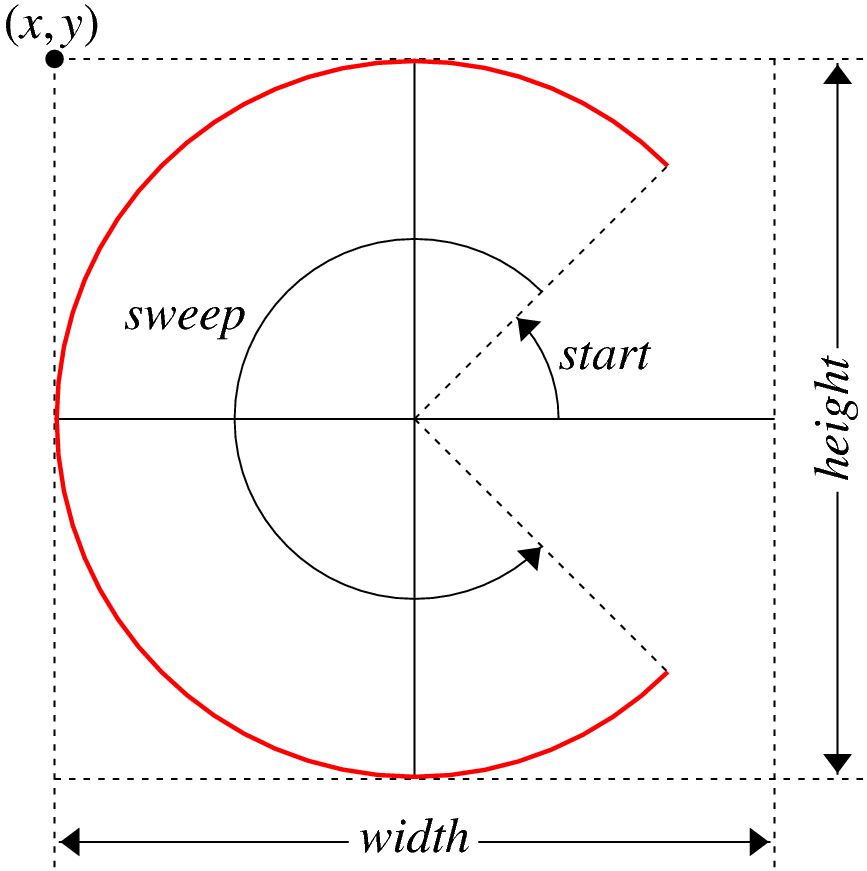
All angles in a GArc description are measured in
degrees moving counterclockwise from the +x axis. Negative
values for either start or sweep indicate
motion in a clockwise direction.
The following diagram illustrates the interpretation of these parameters for the arc shown in red:
Usage:
pt = getEndPoint(gobj);
typedef GObject GLabel;
GLabel containing "hello, world" to
the center of the window:
   main() {
      GWindow gw;
      GLabel label;
      double x, y;

      printf("This program draws the 'hello, world' message.\n");
      gw = newGWindow(600, 400);
      label = newGLabel("hello, world");
      setFont(label, "SansSerif-18");
      x = (getWidth(gw) - getWidth(label)) / 2;
      y = (getHeight(gw) + getFontAscent(label)) / 2;
      setLocation(label, x, y);
      add(gw, label);
   }
Controlling the appearance and positioning of a GLabel
depends on understanding the following terms:
The following diagram illustrates the interpretation of these terms:

Usage:
rect = getFrameRectangle(arc);
typedef GObject GImage;
GImage containing the Stanford
tree at the center of the window, assuming that the image file
StanfordTree.png exists, either in the current
directory or an images subdirectory:
   main() {
      printf("This program draws the Stanford tree.\n");
      GWindow gw = newGWindow(600, 400);
      GImage tree = newGImage("StanfordTree.png");
      double x = (getWidth(gw) - getWidth(tree)) / 2;
      double y = (getHeight(gw) - getHeight(tree)) / 2;
      add(gw, tree, x, y);
   }
Usage:
descent = getFontDescent(label);
typedef GObject GPolygon;
newGPolygon function creates an empty polygon.
To complete the figure, you need to add vertices to the polygon
using the functions
addVertex,
addEdge,
and addPolarEdge.
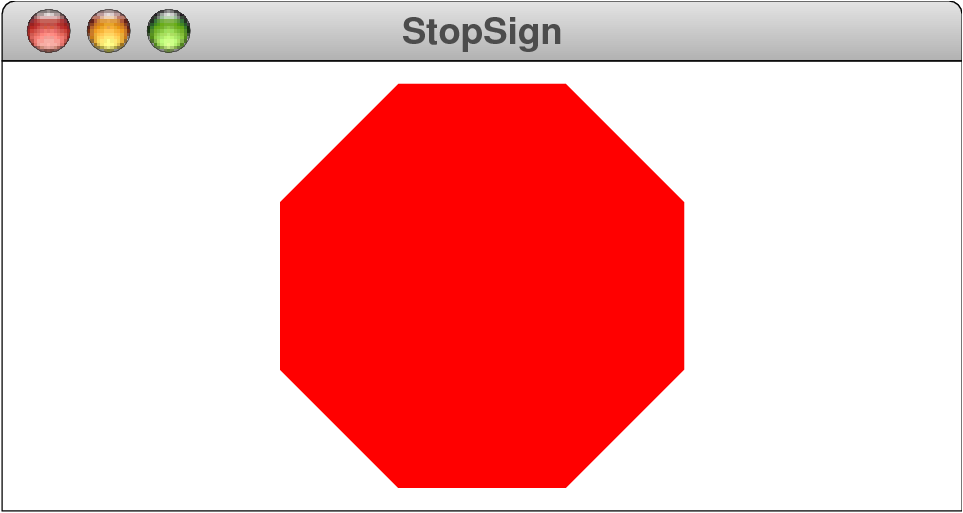
As an example, the following code adds a filled red octagon to
the center of the window:
   main() {
      GWindow gw;
      GPolygon stopSign;
      double edge;
      int i;

      printf("This program draws a red octagon.\n");
      gw = newGWindow(600, 400);
      edge = 75;
      stopSign = newGPolygon();
      addVertex(stopSign, -edge / 2, edge / 2 + edge / sqrt(2.0));
      for (i = 0; i < 8; i++) {
         addPolarEdge(stopSign, edge, 45 * i);
      }
      setFilled(stopSign, true);
      setColor(stopSign, "RED");
      add(gw, stopSign, getWidth(gw) / 2, getHeight(gw) / 2);
   }
The program results in the following picture:
Usage:
GImage image = newGImage(filename);
typedef GObject GCompound;
GCompound keeps track of its own position, and all
items within it are drawn relative to that location.
Usage:
vec = getVertices(poly);
void freeGObject(GObject gobj);
GObject to a GWindow or a
GCompound transfers ownership to the container,
which assumes responsibility for freeing the object.
Usage:
freeGObject(gobj);
double getX(GObject gobj);
Usage:
x = getX(gobj);
double getY(GObject gobj);
Usage:
y = getY(gobj);
GPoint getLocation(GObject gobj);
GPoint.
Usage:
pt = getLocation(gobj);
void setLocation(GObject gobj, double x, double y);
Usage:
setLocation(gobj, x, y);
void move(GObject gobj, double dx, double dy);
dx and dy.
Usage:
move(gobj, dx, dy);
double getWidth(GObject gobj);
Usage:
width = getWidth(gobj);
double getHeight(GObject gobj);
Usage:
height = getHeight(gobj);
GDimension getSize(GObject gobj);
GDimension.
Usage:
size = getSize(gobj);
GRectangle getBounds(GObject gobj);
getLocation. Given a GLabel
object, for example, getLocation returns the coordinates
of the point on the baseline at which the string begins; the
getBounds method, by contrast, returns a rectangle that
covers the entire window area occupied by the string.
Usage:
rect = getBounds(gobj);
void setColor(GObject gobj, string color);
color
string is usually one of the predefined color names:
BLACKBLUECYANDARK_GRAYGRAYGREENLIGHT_GRAYMAGENTAORANGEPINKREDWHITEYELLOWThe case of the individual letters in the color name is ignored, as
are spaces and underscores, so that the color DARK_GRAY
can be written as "Dark Gray".
Usage:
setColor(gobj, color);
string getColorGObject(GObject gobj);
"#rrggbb",
where rr, gg, and bb are
the red, green, and blue components of the color, expressed as
two-digit hexadecimal values.
Usage:
color = getColorGObject(gobj);
void setVisible(GObject gobj, bool flag);
Usage:
setVisible(gobj, flag);
bool isVisible(GObject gobj);
true if this object is visible.
Usage:
if (isVisible(gobj)) . . .
void sendForward(GObject gobj);
Usage:
sendForward(gobj);
void sendToFront(GObject gobj);
Usage:
sendToFront(gobj);
void sendBackward(GObject gobj);
Usage:
sendBackward(gobj);
void sendToBack(GObject gobj);
Usage:
sendToBack(gobj);
bool contains(GObject gobj, double x, double y);
true if the specified point is inside the object.
Usage:
if (contains(gobj, x, y)) . . .
string getType(GObject gobj);
"GOval"
or "GRect".
Usage:
type = getType(gobj);
GObject getParent(GObject gobj);
GCompound that contains this
object. Every GWindow is initialized to contain a single
GCompound that is aligned with the window. Adding
objects to the window adds them to that GCompound,
which means that every object you add to the window has a parent.
Calling getParent on the top-level GCompound
returns NULL.
Usage:
parent = getParent(gobj);
void setSize(GObject gobj, double width, double height);
GOval, GImage,
and GRect (and its subclasses).
Usage:
setSize(gobj, width, height);
void setBounds(GObject gobj, double x, double y, double width, double height);
GOval, GImage,
and GRect (and its subclasses).
Usage:
setBounds(gobj, x, y, width, height);
void setFilled(GObject gobj, bool flag);
gobj, where false
is outlined and true is filled.
Usage:
setFilled(gobj, flag);
bool isFilled(GObject gobj);
true if gobj is filled.
Usage:
if (isFilled(gobj)) . . .
void setFillColor(GObject gobj, string color);
Usage:
setFillColor(gobj, color);
string getFillColor(GObject gobj);
gobj.
rectangle. If none has been set, getFillColor returns
the empty string.
Usage:
color = getFillColor(gobj);
GRect newGRect(double x, double y, double width, double height);
GRect with the specified bounds. By
default, the rectangle is unfilled.
Usage:
rect = newGRect(x, y, width, height);
GRoundRect newGRoundRect(double x, double y, double width, double height, double corner);
GRoundRect with the specified dimensions.
The corner parameter specifies the diameter of the arc
forming the corner.
Usage:
GRoundRect rect = newGRoundRect(x, y, width, height, corner);
G3DRect newG3DRect(double x, double y, double width, double height, bool raised);
G3DRect with the specified dimensions.
The corner parameter specifies whether this rectangle
should appear raised.
Usage:
G3DRect rect = newG3DRect(x, y, width, height, raised);
void setRaised(G3DRect rect, bool raised);
Usage:
setRaised(rect, raised);
bool isRaised(G3DRect rect);
true if this object appears raised.
Usage:
if (isRaised(rect)) ...
GObject newGOval(double x, double y, double width, double height);
GOval with the specified bounds. By default,
the oval is unfilled.
Usage:
oval = newGOval(x, y, width, height);
GObject newGLine(double x0, double y0, double x1, double y1);
x0, y0) and
(x1, y1).
Usage:
line = newGLine(x0, y0, x1, y1);
void setStartPoint(GLine line, double x, double y);
x, y),
leaving the end point unchanged. This method is therefore different
from setLocation, which moves both components of the
line segment.
Usage:
setStartPoint(gline, x, y);
void setEndPoint(GLine line, double x, double y);
x, y),
leaving the start point unchanged.
Usage:
setEndPoint(line, x, y);
GPoint getStartPoint(GObject gobj);
GLine or GArc starts.
Usage:
pt = getStartPoint(gobj);
GPoint getEndPoint(GObject gobj);
GLine or GArc ends.
Usage:
pt = getEndPoint(gobj);
GArc newGArc(double x, double y, double width, double height, double start, double sweep);
GArc consisting of an elliptical arc.
The following screenshots show several examples of how the
GArc constructor interprets the start
and sweep parameters:
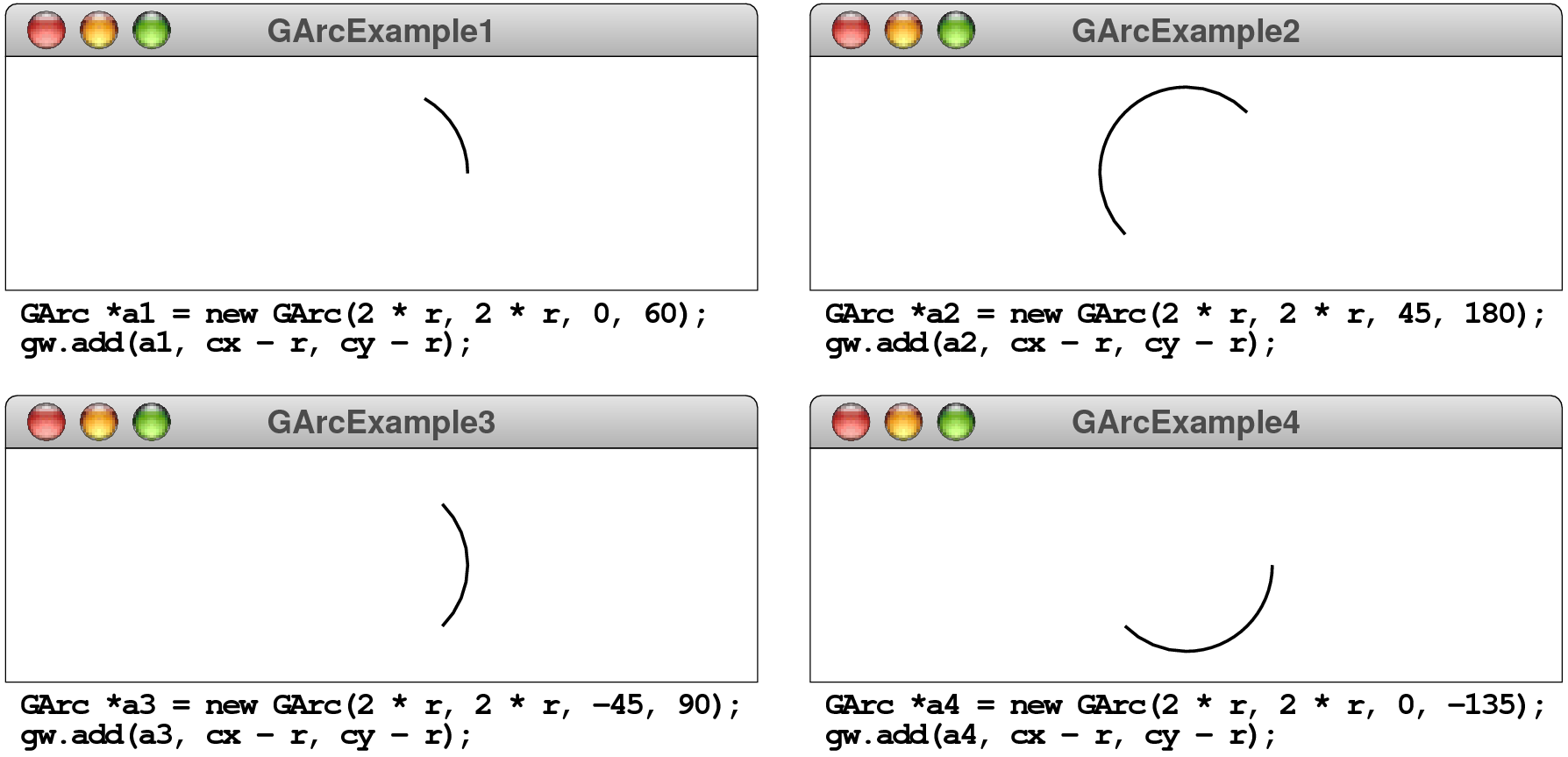
In the code fragments underneath each of these diagrams, r
is the radius of the circular arc, and cx and cy
are the coordinates of the center or the window.
Usage:
arc = newGArc(x, y, width, height, start, sweep);
void setStartAngle(GArc arc, double start);
GArc object.
Usage:
setStartAngle(arc, start);
double getStartAngle(GArc arc);
GArc object.
Usage:
angle = getStartAngle(arc);
void setSweepAngle(GArc arc, double start);
GArc object.
Usage:
setSweepAngle(arc, start);
double getSweepAngle(GArc arc);
GArc object.
Usage:
angle = getSweepAngle(arc);
void setFrameRectangle(GArc garc, double x, double y, double width, double height);
Usage:
setFrameRectangle(arc, x, y, width, height);
GRectangle getFrameRectangle(GArc arc);
Usage:
rect = getFrameRectangle(arc);
GLabel newGLabel(string str);
GLabel object containing the specified string,
positioned with an origin of (0, 0).
Usage:
label = newGLabel(str);
void setFont(GLabel label, string font);
GLabel as specified by
the string font, which has the following format:
family-style-sizewhere both
style and size are optional.
If any of these elements are missing or specified as an asterisk,
the existing value is retained.
Usage:
setFont(label, font);
string getFont(GLabel label);
GLabel.
Usage:
font = getFont(label);
void setLabel(GLabel label, string str);
GLabel object, so that
a new text string appears on the display.
Usage:
setLabel(label, str);
string getLabel(GLabel label);
Usage:
str = getLabel(label);
double getFontAscent(GLabel label);
Usage:
ascent = getFontAscent(label);
double getFontDescent(GLabel label);
Usage:
descent = getFontDescent(label);
GImage newGImage(string filename);
images. The upper left corner of the image is positioned
at the origin.
Usage:
GImage image = newGImage(filename);
GPolygon newGPolygon(void);
Usage:
poly = newGPolygon();
void addVertex(GPolygon poly, double x, double y);
x, y) relative to the polygon
origin.
Usage:
addVertex(poly, x, y);
void addEdge(GPolygon poly, double dx, double dy);
dx and dy from the last vertex.
Usage:
addEdge(poly, dx, dy);
void addPolarEdge(GPolygon poly, double r, double theta);
r, and the edge extends in
direction theta, measured in degrees counterclockwise
from the +x axis.
Usage:
addPolarEdge(poly, r, theta);
Vector getVertices(GPolygon poly);
Usage:
vec = getVertices(poly);
GObject newGCompound(void);
Usage:
comp = newGCompound();
void add(GCompound compound, GObject gobj);
Usage:
add(compound, gobj);
void add(GCompound compound, GObject gobj);
Usage:
add(compound, gobj);